Splitting bundled PDFs into separate documents with n8n and OpenAI's Decisions API
Smart document splitting with OpenAI's Decisions API, tested on three Reddit posts with exactly this problem. Results and n8n templates included.

OpenAI's [Decision API](https://developers.openai.com/api/docs/guides/decisions) is a new 1-shot classifier service which looks to topple the mighty Jev from TypesafeAI (If you don't know what Jev is, check out my [previous article here](https://community.n8n.io/t/n8n-jev-4-awesome-examples-to-get-started) for Jev examples). I finally found some time last week to test out its ability to handle images and it's really impressive! In this post, I wanted to share just one use-case I felt was long overdue to be solved: Smart document splitting.
Say you receive a bundled/batched PDF - which is just many pdfs crammed into one - but to use it, you need to reverse the bundling and split each included pdf out separately. Problem is each of these pdfs have an unknown number of pages so you can't just split by every other page, you need to figure out when each doc ends. There are few options open to you:
1. You do it by hand, noting the page where each doc ends. Accurate but painfully slow and doesn't scale.
2. You scan for text or page elements to determine when docs end. Rigid and breaks when document contents change or with scanned documents.
3. You train image-classification models. Requires special (re)training, can be quite slow and gets more expensive the larger the docs become.
Can the Decision API offer a fourth option which gives you the best balance between accuracy, speed and cost? I found 3 Reddit posts with exactly this problem to test the theory - one dating as far back as 2011 (15yrs ago!). Read on for the results and the templates!
## Prerequisites
- OpenAI key and credits - unfortunately, there is no free tier for the decisions API and you can't n8n gateway credits just yet.
- StirlingPDF - we still need some way to convert our pdf pages to images. For ease of setup, I've chosen StirlingPDF who have a generous free tier we can use. Of course, if you have your own ingestion pipeline, you should use that instead!
## 1. Splitting Large Batched PDF into Separate Invoices
> [u/fatboy40 asks (6ys ago)](https://www.reddit.com/r/sysadmin/comments/j7b20y/software_to_ocr_workflow_a_multipage_pdf_split/)
>
> I've a large PDF that contains multiple unique invoices within it, and I'd like to put this PDF into some software that will OCR page headers for unique data, split the PDF into it's unique invoices, then either e-mail out the invoices based upon the data acquired during the OCR process or place the invoices that cannot be e-mailed into a networked folder.
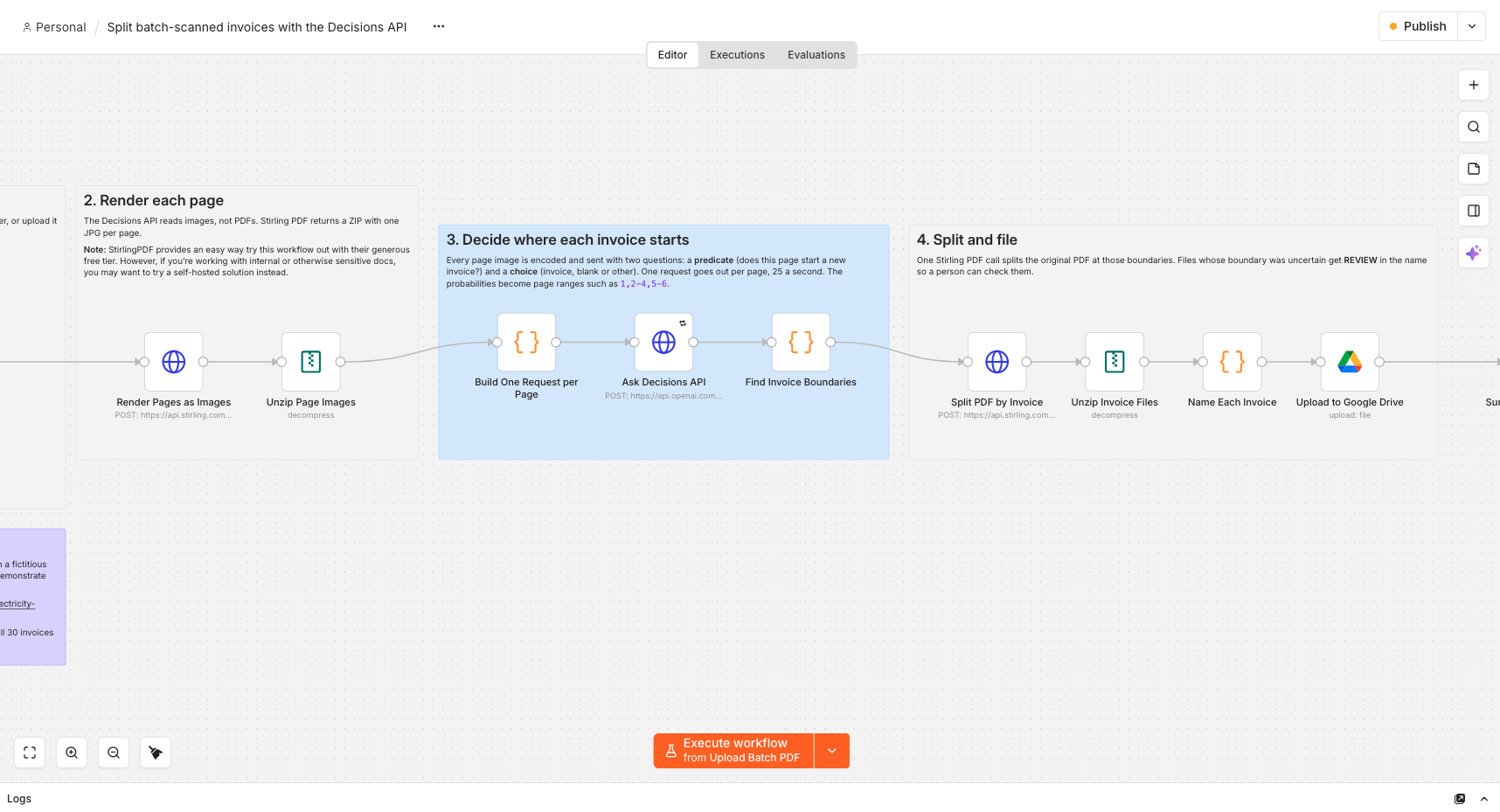
<n8n-template href="/share/zRguNUA" type="JSON" size="27 KB">Splitting Invoices Template</n8n-template>
**Test**: 129 page PDF containing 30 separate scanned invoices ([preview](https://cdn.subworkflow.ai/n8n-templates/acme-electricity-company-batched-invoices.pdf))
**Results**: Successful! Decisions API completed in 7.4 seconds and costs $0.02.
One thing when using Decisions API is that you still need an ingestion pipeline to convert the PDF pages to images. Here we're using StirlingPDF - if you need more privacy, definitely check out the self-hosted version - but feel free to swap for something else. I was incredibly impressed with the speed the first time I ran this test - 54 milliseconds per page!
## 2. Splitting University Admission Packets into Separate Documents
> [u/ActionLeagueLater asks (15yrs ago)](https://www.reddit.com/r/techsupport/comments/mtdgt/need_help_finding_a_program_to_split_pdfs_based/)
>
> I work for a University in the admissions office and we get large PDFs of every document that an applicant uploads to us. What I need to do is split these PDFs into separate documents. Each of the separate documents has a head at the top of what type of document it is (Statement of Purpose, Transcript, etc)...
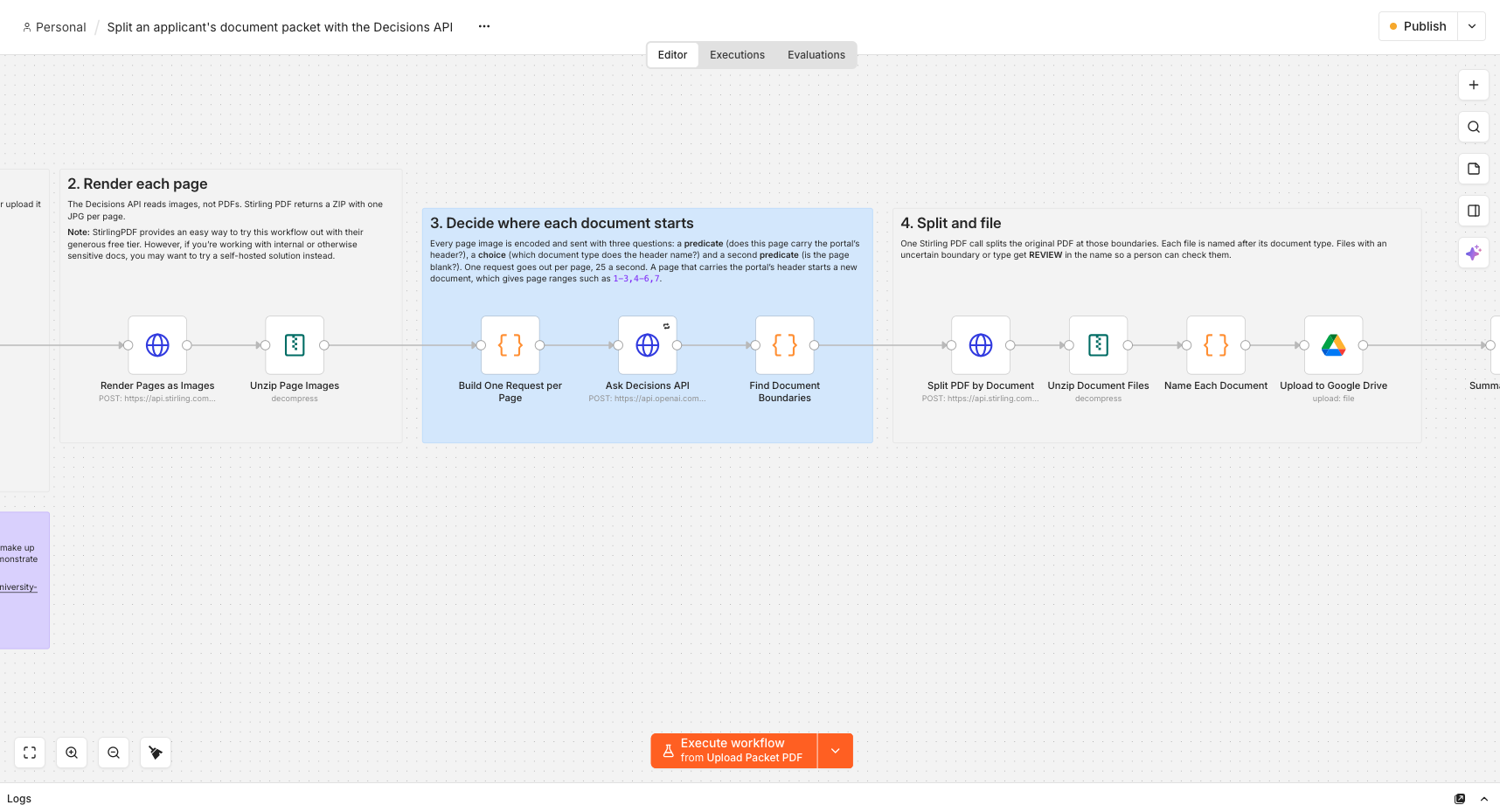
<n8n-template href="/share/bGScryz" type="JSON" size="30 KB">Splitting Admissions Packet Template</n8n-template>
**Test**: 42 page PDF containing a 15 mixed documents ([preview](https://cdn.subworkflow.ai/n8n-templates/merrodale-university-admissions-packet.pdf))
**Results**: Successful! Decision API completed in 1.8 seconds and costs $0.006.
This template is more of less identical to the invoices template but of course, the prompt is quite different. The lesson here is that the wording is very important to the accuracy of the classification and you may need to fine-tune with variations.
## 3. Reorganising Legal Discovery Document Dumps by subject and Date
> [u/rs420rs asks (6d ago)](https://www.reddit.com/r/legaltech/comments/1wyks7k/recommendations_for_best_litigation_doc_org_ai/)
>
> Litigator in small firm (20 attys, only 5 litigators). I'd really like an AI tool that can take a document dump, say a 10,000 page pdf, and organize it into discrete documents, titled by date and subject, indexed chronologically.
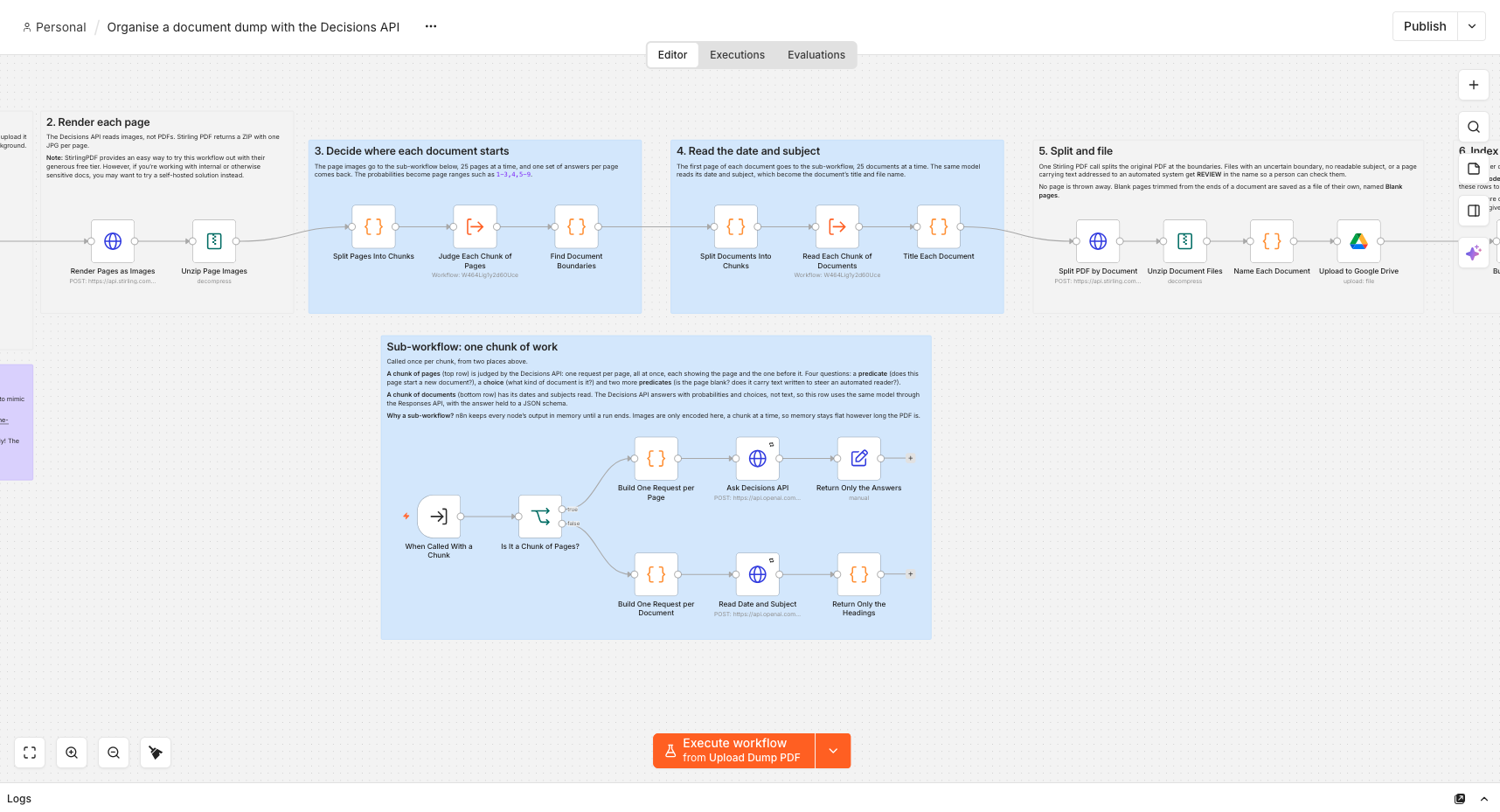
<n8n-template href="/share/aNR5npx" type="JSON" size="50 KB">Splitting Legal Discovery Template</n8n-template>
**Test**: 300 page, 25mb PDF containing 167 mock legal discovery documents ([preview](https://cdn.subworkflow.ai/n8n-templates/ecorp-vs-acme-electricity-company-discovery.pdf))
**Results**: Successful! Decisions API completed in ~40 seconds and cost $0.12.
This template differentiates in 2 ways:
1. Includes the extraction step to title all documents once they are separated from the whole.
2. To handle a larger number of pages (1K to 10K), it uses a subworkflow to better mange memory usage.
Overall really satisfying performance and for a really low low cost, recommended as a solid addition to any legal documents pipeline.
## Conclusion
OpenAI's decision API is definitely a powerful tool and a great alternative if you're looking for speed and a way to optimise for cost. Good to know that by default, the decision API just uses gpt-6-luna under the hood so there is an option to switch to the larger model for breadth at the cost of more tokens.
This PDF splitting use-case is just one of many I'm exploring which fits into the n8n way of working. If you work with classifications or documents and have a use-case which is not covered here and you'd like to explore, get in touch for a quick chat! You can reach me at [hello@subworkflow.ai](mailto:hello@subworkflow.ai) or connect with me on [Linkedin](https://www.linkedin.com/in/jimleuk).
Cheers!
Want to talk it through?Jim Le, Founder. linkedin.com/in/jimleuk